Showing posts with label Budgeting. Show all posts

Monday, January 6, 2014

January Financial Goal

Before our move, I set a financial goal each month. Now that we are settled in a bit, I plan on continuing that pattern.

January goal = No spending money on food/coffee at work


Gasp!

These goals may seem silly, but they really add up in the long term. Plus, they help set good spending habits. My financial goal for the remainder of year will vary each month.  And sometimes, it will just be a week-long goal (i.e. using pantry and freezer foods for a week instead of grocery shopping).

They're a lot of fun, so feel free to join or comment with any financial goals you might set for yourself or ideas you have for future months.

Thursday, November 21, 2013

Our $900 car

This was a year ago now, but it's still an important story to tell.

In 2011, we purchased a 2012 Hyundai Accent. It was exactly what I/we wanted: 4 doors, 5-speed manual, small, great on gas and perfect for my 60-mile commute.


You know what wasn't perfect about it? The $300 car payment each month.

When we learned that I was pregnant last year, we decided it was time to get rid of the new (and pretty!) car. It was time to get serious about getting out of debt.

Selling the car to Carmax required us to pay off about $1500 extra on the car loan to make up the difference for what Carmax would purchase our car for.

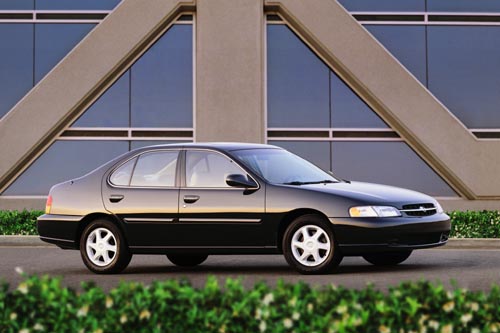
We replaced the car with a 1998 Nissan Altima for $900.

Stock photo.

The Nissan has ... character. Only the driver's door unlocks with the key. The rear-driver's-side door has to be manually locked and unlocked. Sometimes, the volume on the radio goes the opposite way you think it would. The gas door has to be gently punched to open. When the car doesn't start, you just need to jiggle this section under the hood. Let's not exclude the time it was keyed.

To sum it up, it's a pretty glamorous ride.

We paid $900 for the car and about another $1000 for new tires, title transfer, registration and some minor repairs. So, $1900 plus the $1500 we had to pay off on the Hyundai.

$900 + $1000 + $1500 = $3400


Since we were paying $300/month for the Hyundai, it took 12 months of owning the Nissan to actually start banking money. That might seem like a lot, but guess what? We have been driving the car for three months beyond that and we haven't had to pay a single car payment on it, and it hasn't needed more than regular maintenance.

One debt paid off.
One step closer to becoming debt-free.


Tuesday, July 9, 2013

We're full of excuses

When I tell people that we are striving to get out of debt and the things we do to achieve that goal, they first look at me like I just told them we plan on moving to Mars. Then they start with the excuses.

We all have excuses, but it takes guts to toss the excuses and stomach reality.

Here are the common excuses I hear:


#1 I need a smart phone for work, I can't get rid of my plan.

That's not true (well, you may need it for work, but you can totally scrap that plan). Let's say you have AT&T.

Your AT&T monthly plan
$70 unlimited minutes
$50 5GB of usage
$20 unlimited messaging
-----------
$140 total

Option One: 
Switch to Straight Talk monthly plan
$45 unlimited everything
-----------
$45 total


Option Two:
Switch to Republic Wireless monthly plan
$19 unlimited everything
-----------
$19 total

Your possible monthly savings = $121


#2 I need a good car for work, so I don't mind having a car payment.

Ugh. Stop. Be honest, you just don't want to roll up in a car with mutli-colored parts and an awkward thumping sound.

Your $350 car payment plan
You have a car, but you don't own it. Woo hoo!
-----------
$350 total

The clunker plan
Sell your new car. Any. Way. You. Can.
Buy a car for $1,000 (3 months of car payments).
Put $100 into a savings account each month for car maintenance and eventual car replacement. You should be doing this with a new car as well for maintenance.
-----------
$1,000 initial investment


Your possible monthly savings = $350


#3 I could never part with cable -- I have to unwind with television at the end of the day.

Sure, I get that ... to an extent. I like to let my brain melt for a little while as well, but you don't need cable to do that. We do Netflix and Hulu and that's more than enough.


Your AT&T monthly plan
$60 per month
----------
$60 total


Netflix and Hulu Plan
$8 Netflix
$8 Hulu
----------
$16 total

Your possible monthly savings = $44


If you do all three of these, you could save $515 per month. That's a lot of money. How much money?

If you have a $15,000 student loan at 6.5% interest rate with a $150 minimum payment:

You only pay the minimum
12 years of payments
$6,663 of total interest paid

You add your $515 monthly savings
2 years of payments
$1026 of total interest paid


So in the end, your $515 in savings each month saved you over $5,000 and 10 years of payments (not to mention the interest you saved by selling your new car and the months of payments saved there).


This is just a tiny glimpse of how making small sacrifices pays off in the ending. As Dave Ramsey would say, delaying pleasure is a true sign of maturity. Stop making excuses, stop being a coward and start making changes for a better future.


Note: I am not a financial consultant. These numbers are calculated by me. To get accurate advice for your situation, contact a financial planner.

Thursday, June 13, 2013

Reduce your energy usage

We've all seen the Sesame Street episodes about turning off the lights when you leave the room to save energy, but who knew that we would still be applying that same principle to reduce our monthly bills?

Last fall, J and I really wanted to reduce our energy usage. Here are some steps that we have taken:

  1. Shut off lights when we leave the room (duh).
  2. Put the TV, bluRay player and Internet thingy on a power strip. Turn the strip off when we leave the house or go to bed. Those silly little lights that glow eat up energy. We do the same with small kitchen appliances.
  3. Line dry our clothes in the warmer months (even though our dryer uses gas).
  4. Put the ceiling fan on in our bedroom and adjust the air conditioning in warmer months at night. Ceiling fans take up significantly less energy than an air conditioner.
  5. Keep curtains drawn in the warmer months to keep the heat out. (Look into energy-saving curtains.) We do the opposite in winter when it's sunny.

Those are the majority of the small changes we've made, but look at the difference it's made:

Comparing energy usage with neighbors
In September of 2012, we got our energy usage even lower than our "efficient" neighbors!


Please keep in mind that we have three exterior lights on our house that stay on 24/7. We leave them all on throughout the night as a safety precaution since our neighborhood is older and has limited street lights. 

We plan on learning more ways to reduce our energy usage in our home throughout this year.

Looks like we need to our heads back in the game. May was cutting it close!

Energy bill for May
May 2012
Check your local energy provider's website to see your usage compared with your neighbors. Our energy company determines "neighbors" as people living in the same square footage withing 0.4 miles of us.

Do you have any good energy-saving tips?

Friday, May 31, 2013

Review of Ting

We love Ting!

Okay, that's a pretty one-sided review, but let me tell you the reasons we love Ting.

1. It's simple.
Ting doesn't make things complicated. They have zero contracts and their website is super easy to use.

2. It's cheap!
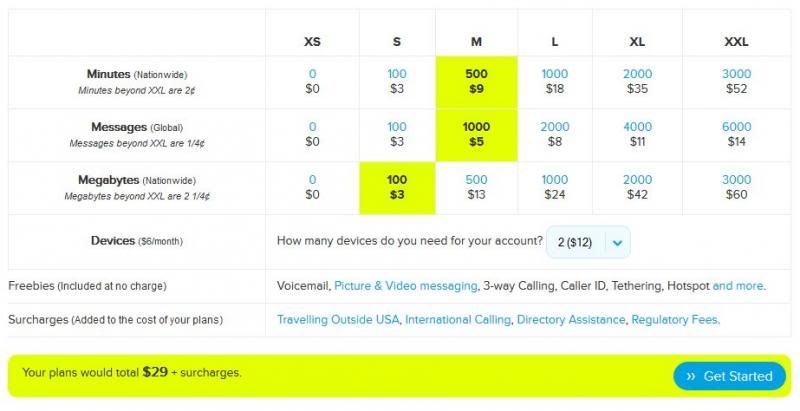
J and I spend $29 for two smart phones with Ting. No, your eyes didn't deceive you. Just $29 for the two of us. On Verizon, we were spending $90 on bare bones flip phones. Here's our Ting plan:
3. You never get put on hold.
How annoying is it when you call a customer service number and you have to go through an entire menu, only to be put on hold? More annoying than a mosquito in your bedroom at night, that's for sure. With Ting, you call and the line starts ringing and someone picks up! It's amazing! I've also had to use their online form to submit a question, and I received a helpful response within the hour.

4. It runs on the Sprint network.
This factor could be good or bad for people, depending on Sprint service in your area. For us, it's great -- we've never had any issues with service. As an added bonus, you can take almost any Sprint phone to Ting.

5. You can get inexpensive phones off eBay.
The phones on Ting's website are pretty costly (for us cheapos), so I ordered Sprint phones off eBay. J got an HTC Evo Shift for $80 and I got a Samsung Google Nexus S for $60. Both phones are contract-free! If you go this route, just be sure the phone has a clean ESN. A bad ESN will not allow you to activate the phone.


The not-so-great features of Ting: They don't have any local retail stores, so you need to do everything online. If you are bringing over a phone from Sprint, you need to do all the nerdy stuff on your own. Ting provides very helpful guides, but it can still take a few hours to get everything up and running.

Switching to Ting = Saving $60/month for us.

If you are interested in learning more about Ting, visit using my referral link and save $25 on your first month of service or a new Ting phone!

This review is in no way sponsored by Ting.


Wednesday, May 29, 2013

The $1,000 challenge!

Summer is creeping its way into our home and things are starting to feel stuffy. It's time to eliminate the clutter!

When things in our house start to get cluttered, I get anxious (hence why I don't like hosting family parties in our tiny home), so now is the perfect time to get rid of all this stuff!

My goal: Sell $1,000 in stuff this summer.

This will include selling on eBay, craigslist, local swap sites, our garage sale in July, etc.

So far, I've sold around $500 in stuff, so I will try to update the blog as I go and give tips for selling!

To view my ongoing tally of sold items, visit The $1,000 Challenge page.
Pin It button on image hover